Electronic circuit simulation, made visible: Build it.
Run it.
See why.

Simvolta is a desktop circuit simulator. Draw a schematic, run DC, transient or AC analysis, or go Live, and see voltage and current on the circuit itself.

Local-first desktop app In development

SIMVOLTA / WORKSPACE01 — RC LOW-PASS
ACTUAL APP
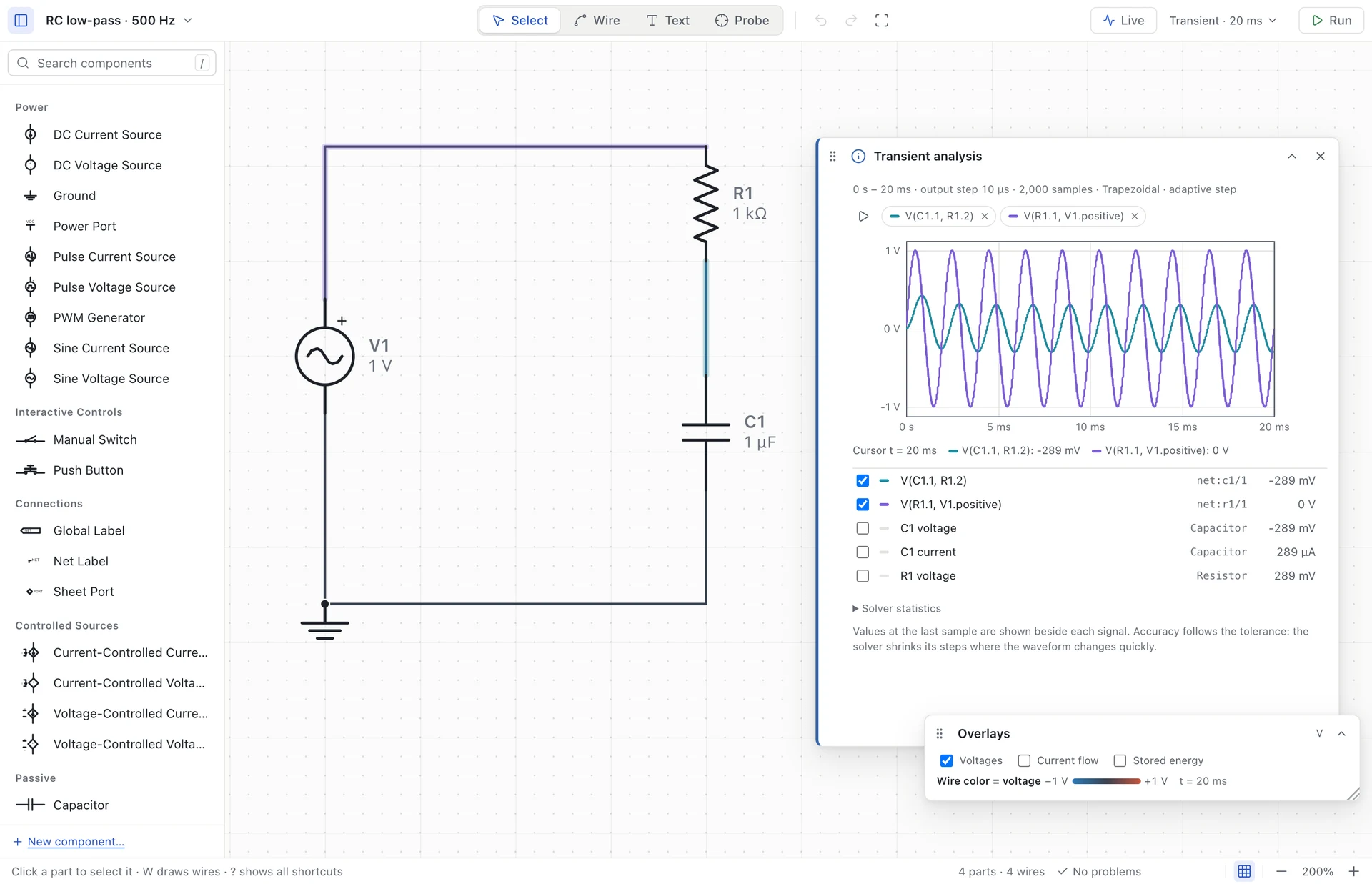
Real desktop RC circuit with a 1 kilohm resistor and 1 microfarad capacitor; input and output waveforms are shown together.
500 Hz in. A smaller, delayed signal out.Full-size capture ↗Actual Electro development build, the application behind Simvolta.
INPUT500 Hz
RC NETWORK1 kΩ / 1 µF
SETTLED OUTPUT0.303 V peak
A CIRCUIT SIMULATOR FOR CURIOUS MINDS
Visual editorDC · Transient · ACOffline by design

SEE IT BUILT · 0:40

Empty canvas.
Live circuit.

Search a part, wire the pins, type a value, press Live. Then close the switch and watch the capacitor charge, in real time.

Real desktop recording, no sound. The waveform comes from the desktop solver; step captions and cursor were added for this video.
Read the transcript
  1. Search a part, click to drop it in.
  2. Add a switch, resistor and capacitor.
  3. Press W, then click pin to pin.
  4. Type values the way you say them: 470u.
  5. Hit Live: it simulates while you watch.
  6. Press P, click a wire to put it on the scope.
  7. Click the switch and watch it charge.

The circuit is a 5 V source, a switch, a 1 kΩ resistor and a 470 µF capacitor (τ ≈ 0.47 s). After the switch closes, the oscilloscope shows the capacitor voltage rising toward 5 V while current dots move through the wires.

GO DEEPERHow does a charge pump turn 5 V into nearly 10 V? Read the guide or watch the narrated tutorial.

01 / THE WORKFLOW

Less friction.
More understanding.

From the first connection to the last measurement. Stay close to your circuit, every step of the way.

01

Think it. Build it.

Find a part, drop it on the canvas, connect its pins. A clear workspace for the next idea.
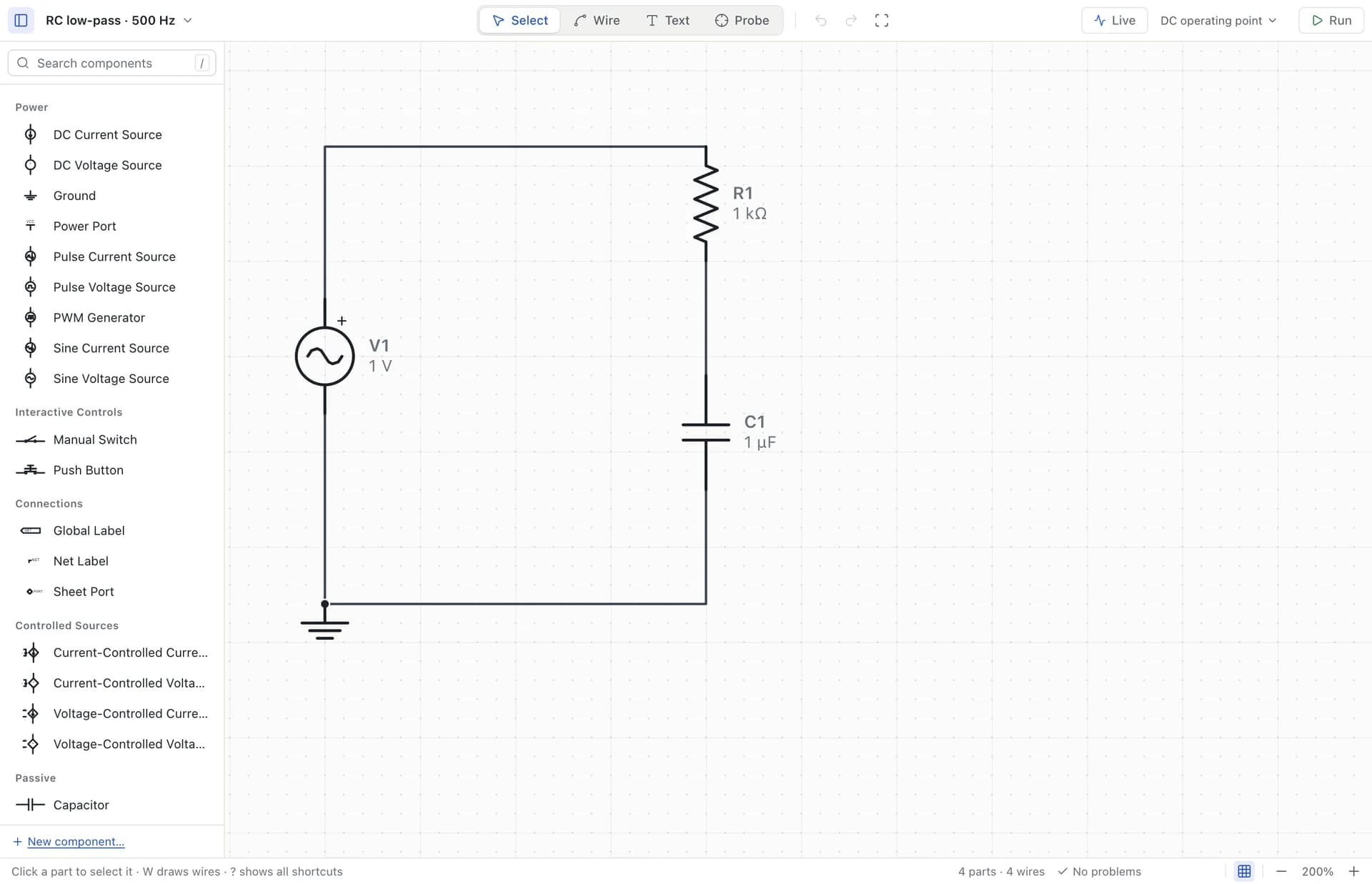
Actual canvas editor: searchable component library and a connected RC circuit
W WireR Rotate⌘ / Ctrl Z Undo
02

Change a value.
Ask another question.

Find a steady state, watch a transient, or sweep a frequency. Run again and see what changed.

DCTRANSIENTAC SWEEP
03

Follow the signal.

Probe a wire. Compare traces. Read voltage, current and power in the context of your circuit.
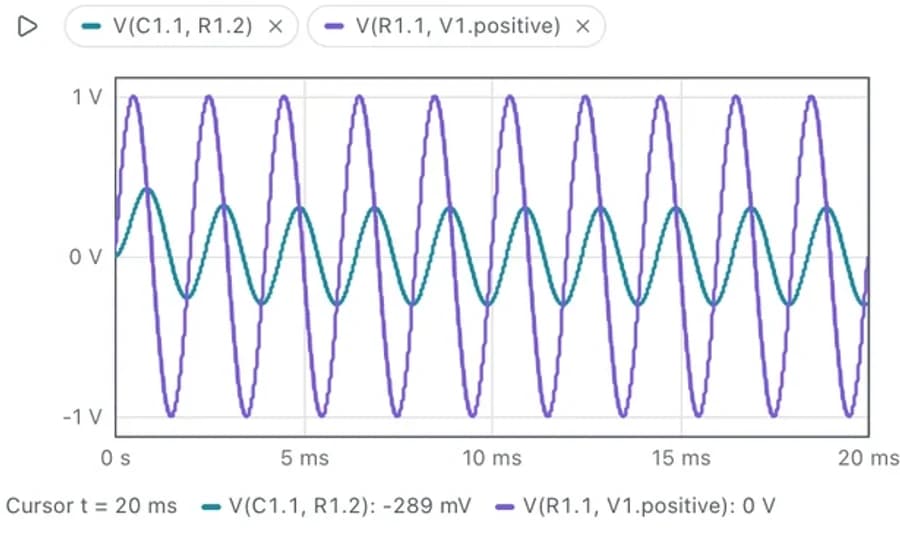
Captured input and output voltage traces from the actual RC transient result

02 / INSIDE THE SIGNAL

Don’t just see a result.
Understand the behavior.

Three ways to ask “why?”
Explore real results from the desktop solver.

CAPTURED DATA

SIGNALS OVER TIME

One signal in. A new perspective out.

A 500 Hz sine passes through an RC low-pass filter. The output is smaller, and arrives later. Select a node to follow its trace.

1 volt peak sine source, 1 kilohm series resistor and 1 microfarad capacitor to ground. Input at source; output at capacitor.R1 · 1 kΩC11 µFV11 V pkINOUT
RC LOW-PASS

1 kΩ · 1 µF · 500 Hz · 1 V peak

TRANSIENT / VOLTAGE12–20 ms
Captured 500 Hz RC filter waveforms. Input peaks at 1 V; output peaks near 0.303 V and lags behind.1 V0 V−1 V12 ms14 ms16 ms18 ms20 ms
t 16.00 msCH1 0.000 VCH2 -0.289 V

Reduced motion: use the slider or arrow keys to inspect samples.

03 / YOUR WORKBENCH

Built for the way
you think.

Explore all capabilities

MAKE IT YOURS

Your parts. Your possibilities.

Start from a template. Define pins, parameters and a symbol. Test your component, then reuse it from your personal library.
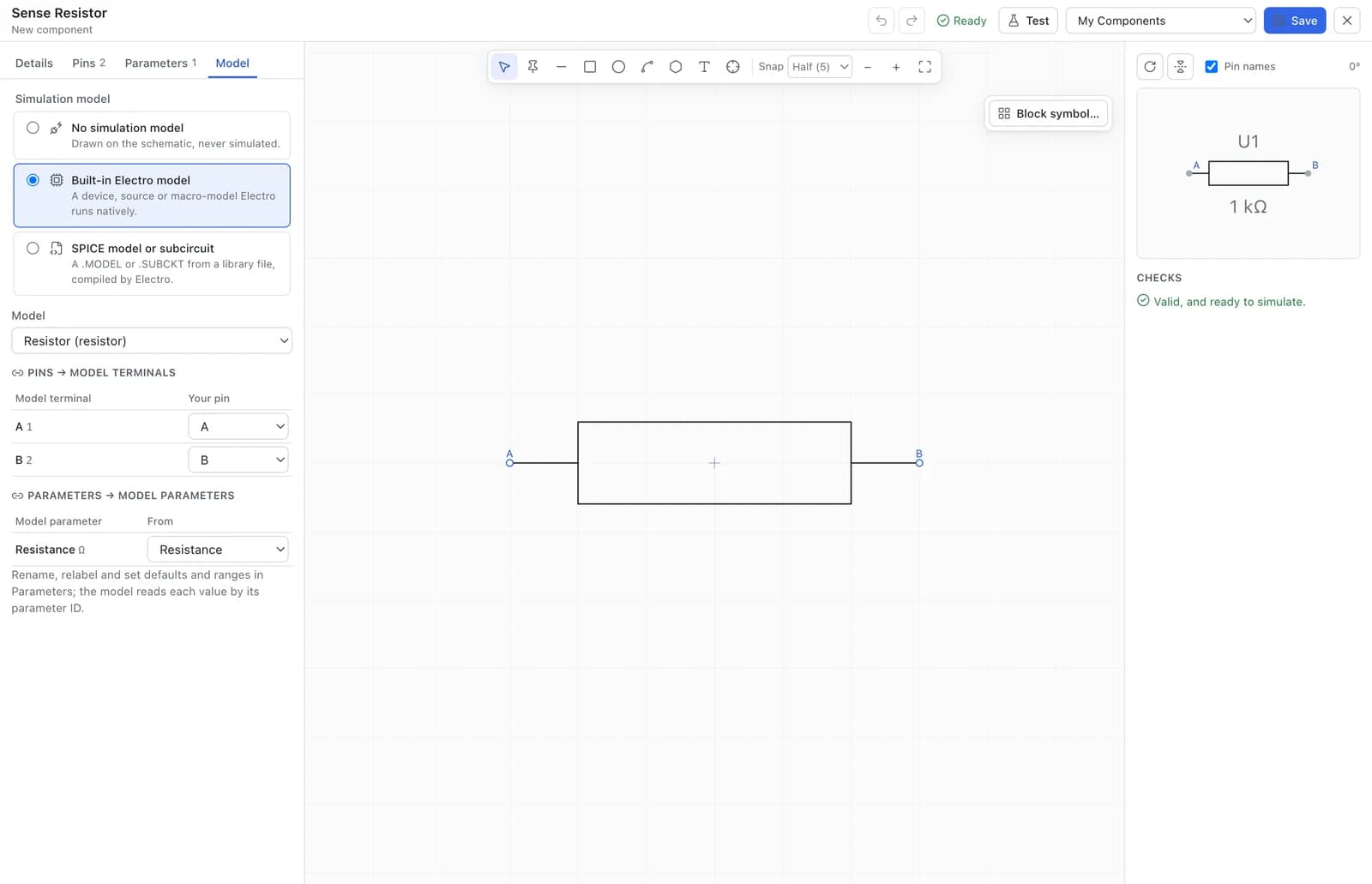
Actual component editor with a Sense Resistor template, symbol preview and explicit simulation pin mapping

Captured from the current desktop component editor.

LOCAL BY DESIGN

A laboratory.
On your computer.

Explore an idea before reaching for the breadboard. Save it, close it, pick up where you left off.

Work offline
The desktop solver runs locally. No cloud round trip, no desktop telemetry.
Keep your work
Versioned project files and local recovery backups. Your circuit stays yours.
Take ideas further
Import and export supported SPICE, KiCad and CircuitJS circuits.
See interchange support

04 / START WITH A QUESTION

Small circuits.
Big realizations.

Real circuits from the app.
One clear experiment at a time.
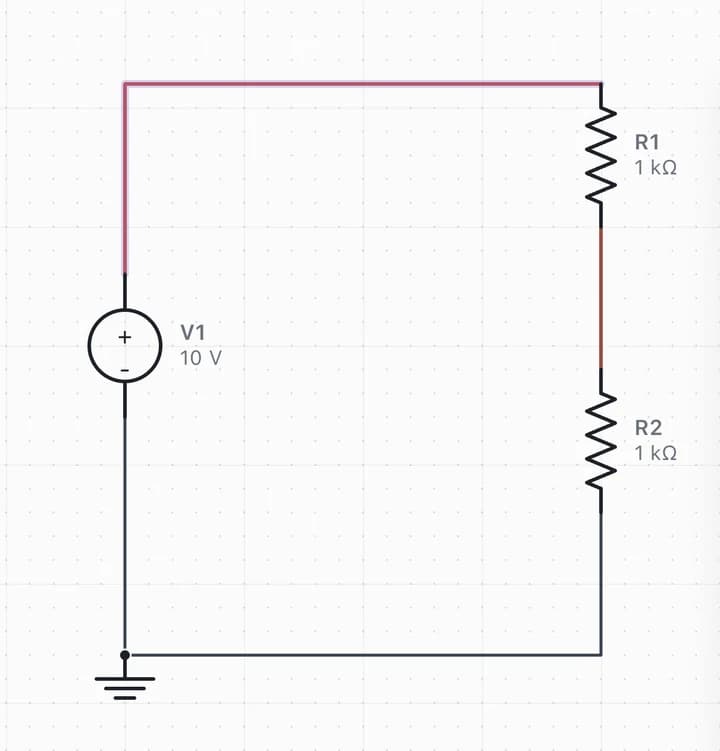
All circuit examples
Actual the voltage divider schematic in the desktop editor

01 / DC FUNDAMENTALS

The voltage divider

Two resistors. One useful lesson in voltage, current and loading.

10 V in → 5 V out Build video · 0:31
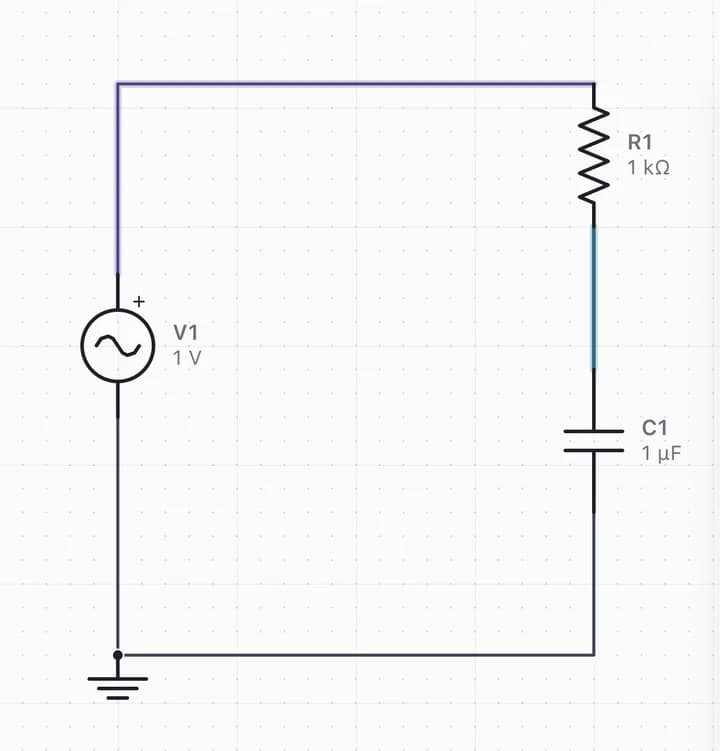
Actual a signal, smoothed out schematic in the desktop editor

02 / FILTERS & FREQUENCY

A signal, smoothed out

Watch an RC filter reduce a signal, then find its corner frequency.

500 Hz in → 0.303 V peak Build video · 0:33
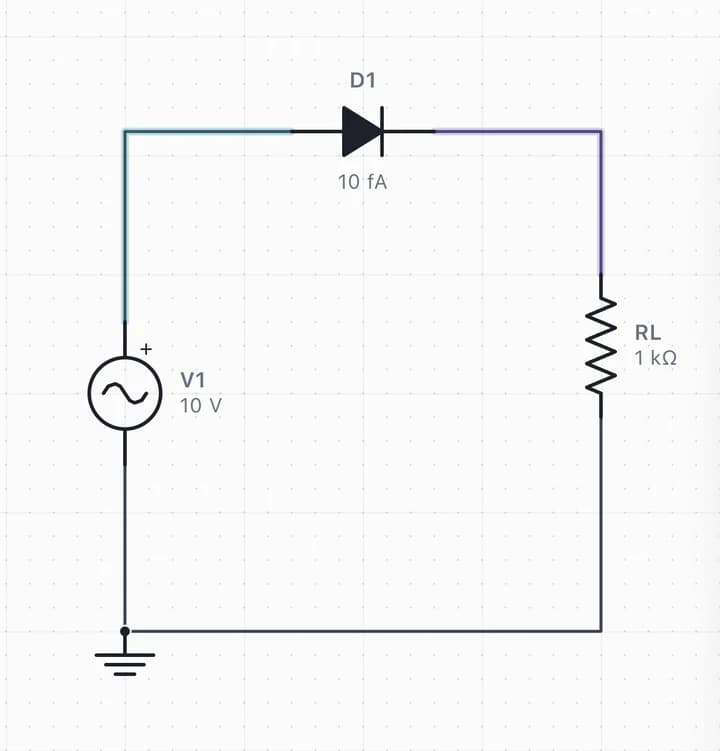
Actual one direction changes everything schematic in the desktop editor

03 / DIODES & WAVEFORMS

One direction changes everything

See a diode pass the positive half of an AC waveform.

AC input → half-wave output Build video · 0:34

THE LAB NOTES

A little theory.
A lot of discovery.

Visit the learning library

POWER CONVERSION · 14 MIN READ

Narrated tutorial + build videos

Capacitive DC-DC converters: how a charge pump works.

See how a charge pump doubles or inverts a voltage with switches and capacitors, why its output sags under load, and simulate both circuits in Simvolta.

SIGNALS & INTUITION · 7 MIN READ

Read an RC filter in time and frequency.

Connect a 500 Hz transient to a 159 Hz Bode corner, and learn why startup, phase and small-signal analysis tell different parts of the story.

SIMVOLTA AT A GLANCE

What it is.
Where it stands.

The short answers, before you decide whether Simvolta is worth a place on your desk.

What is Simvolta?
A desktop application for drawing electronic circuits and simulating them. You build a schematic on a canvas, run an analysis, and read voltage, current and waveforms in the context of the circuit itself.
Who is it for?
Students learning circuit fundamentals, hobbyists checking an idea before the breadboard, and anyone teaching or explaining how a circuit behaves.
Which analyses does it run?
DC operating point, transient (waveforms over time) and AC small-signal frequency response with Bode plots. When to use each analysis.
How does Live simulation work?
Live runs the circuit continuously. Operate switches, push buttons and PWM duty while it runs, and watch wire colors, moving current dots and the oscilloscope respond without restarting.
What can I build?
Resistors, capacitors, inductors, transformers, DC, pulse, sine and PWM sources, diodes, BJTs, MOSFETs, op-amps, comparators, a 555 timer and controlled sources, plus your own components. Start with the circuit examples.
How are projects stored?
As versioned files on your computer, with local recovery backups; the simulator works offline. Documented subsets of SPICE netlists, KiCad schematics and Falstad/CircuitJS circuits can be imported and exported. Interchange details.
Can I download it today?
Not yet. Simvolta is in development and no public installer has been released. macOS Apple Silicon development builds are tested; Windows release validation is in progress. Release status.
Why get a release notification?
One email when a verified release is available for download. No newsletter. The privacy page explains how the address is handled.

THE NEXT CIRCUIT IS YOURS

Bring your
“what if?”

Simvolta is in development. Get one email when a verified desktop installer is available. No newsletter.

Release & platform details

macOS Apple Silicon development build tested.
Windows release validation in progress.

A NOTE FROM THE LAB

Get notified when Simvolta launches

Be among the first to know when Simvolta becomes available.

Checking registration availability…

No spam. Just a release notification. Privacy policy.